
Beginner WordPress users have difficulty logging in to their accounts. But knowing and being able to change your WordPress login is a security practice that even advanced developers and administrators should know to better manage their own websites and those of their clients.
Importance of WordPress login
After installing WordPress, you’ll have access to your website’s admin dashboard, where you can configure your site as needed and make any changes you see fit.
But that would be impossible if you didn’t have access to the admin pages. The WordPress login page is what serves or, if you prefer, prevents you or others from accessing the “management” side of your WordPress site.
It is virtually impossible to take full control of your site/blog if you don’t have access to the admin area,
But where is this WordPress login page located?
How to Find Your WordPress Login URL:
The WordPress login page can be reached by adding / login /, / admin /, or /wp-login.php to the end of your site’s URL.
Typically, these cases should take you directly to the WordPress login page, but if that doesn’t happen, there’s another way to get to your login page: you can add /wp-login.phpto the end of the URL, like this:www.iltuosito.com/wp-login.php
If you installed WordPress in a subdirectory (www.yoursite.com/wordpress/) or subdomain (blog.yoursite.com/), add one of three paths to the end of your URL, such as: www.yoursite.com/wordpress/wp-login.php or blog.yoursite.com/wp-login.php .
Alternatively, there is a “Remember Me” option in the WordPress login form, which will allow you to stay logged in and reach your admin dashboard for a few days without having to log in again (depending on how your cookies are set):
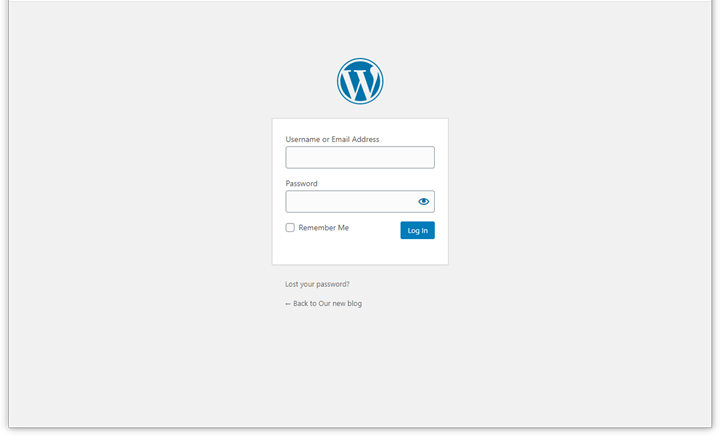
Logging in via the WordPress login page is crucial, but easy to do. Assuming nothing wrong or malicious has happened to your site, you’ll need your email address/username and password.
That’s all. Unfortunately, malicious individuals, hackers, wannabe hackers, and various other troublemakers are everywhere, and this is one of the first targets they identify for their purposes.
What can we do to discourage them, then?
Let’s move or modify at least the WordPress login page!
How to Edit Your WordPress Login Page
Your login page shouldn’t be accessible to hackers and malicious attackers (aka bad guys), because they could access your site’s admin page and start ruining your day. Trust me, it’s not a pleasant experience!
While using a complex, unique, and long password can really help prevent unauthorized access to your site, there’s never enough you can do when it comes to security.
A quick and effective way to keep out malicious users is to move your WordPress login page to a new, unique URL . Changing the login URL through which you and your users can access your WordPress site can really help when it comes to combating random attacks, hacks, and brute force attacks.
A word about brute force attacks: Brute force attacks are hacking attempts in which the attacker repeatedly tries to guess your username and password by exploiting lists of common usernames and passwords leaked online. They simply try thousands of combinations using scripts that automate all their attempts.
There’s a high probability that your WordPress password or username could be on one of these lists being passed around. Add to this the fact that the default WordPress login URL is publicly known, and you can see how easy it can be for hackers and malicious attackers to gain access to your WordPress site.
That’s why simply moving your WordPress login page to a different, lesser-known location can help.
Edit Your WordPress Login Page with a Plugin
The most common and probably easiest way to change your WordPress login URL page is to use a free plugin like the widely used WPS Hide Login .
The plugin is very lightweight and, most importantly, doesn’t modify any files in the WordPress core or add any rewrite rules. It simply intercepts requests. It’s also compatible with almost all other plugins and shouldn’t cause any issues.
Of course, there are many others, it’s just a matter of finding the one that’s best for you.
To be clear, it should be noted that this would discourage many malicious individuals, especially the most inexperienced, but experienced and professional hackers could potentially still do what they can and still understand your login page.
Changing your login URL can also help prevent common WordPress errors like ” 429 Too Many Requests .” This is typically generated by the server when the user has sent too many requests in a certain amount of time (rate limiting). This can be caused by bots or scripts targeting your login URL. The end user rarely causes this error.
But security must be interpreted on multiple levels: the more tools, tricks, and firewalls you have running, the more difficult it will be for any malicious person to enter your site and gain control of it.
Changing Your WordPress Login Page by Editing Your .htaccess File
Another, more technical, way to change or hide the WordPress login page URL is to edit the .htaccess.
The file .htaccess‘s main role is to configure rules and configure system-wide settings. Since we’re talking about hiding the login page, .htaccesswe can’t manage that. However, this is a very technical operation, so I’ll write a separate article about it.
Limiting login attempts
Another effective security method is to limit the number of login attempts. This can be done with a free plugin like Limit Login Attempts Reloaded.
Naturally, since WordPress security is a complex topic, we’ll explore it in more depth later to give it the attention it deserves.
