
Surely, your goal is for people to find your website through Google, and that requires at least a basic understanding of SEO. But don’t worry, following this SEO guide will make it easier than you think.
Let’s discover together what SEO is, how to set up your site for success, and how to get it indexed.
1. The basic SEO fundamentals
What is SEO?
Search Engine Optimization includes all those activities aimed at improving the scanning, indexing and positioning of information or content in search engines. In simple terms, SEO is doing things that help you show up and rank higher in the organic results of a search engine.
Why is SEO important?
Chances are, people are searching for what you do, and you can attract customers by ranking for those terms. But you won’t be able to do it without effort, since others are trying to do the same, and “others” means millions of websites and web pages. That’s why SEO is important: it will have to convince Google that you deserve a higher ranking than others.
What are the benefits of SEO?
The first consideration is that most people click on one of the first results in the Google search window, so higher rankings usually lead to more traffic. Unlike other channels, search traffic tends to be consistent and passive. This is because the number of searches is generally fairly constant from month to month.
Furthermore, search traffic is also “free” and we know that paid ads also appear on the Google page, but this could be a problem because the ads can be expensive.
For example, let’s say we get about 1.4 million monthly visits to our website from organic search. To get the same traffic from search ads, it might cost us about $1.7 million per month.
How is SEO done?
SEO, in essence, involves five main steps:
- Keyword research . Find and understand what people are searching for.
- Content Creation. Create content for researchers.
- On-Page SEO. Make your content as clear as possible.
- Link building . Build trust and authority with links from other websites.
- SEO techniques . Help search engines find, crawl, and index your content efficiently.
2. Set up SEO success
If your website is set up correctly, achieving SEO success is much easier than it seems. Let’s look at some methods for doing so.
Get a good domain
Most domains are good for SEO, so don’t panic if you already have one. But if you’re still looking, keep these two elements of a good domain in mind.
Domain name
The best thing is a short, easily memorable domain name. Preferably, don’t try to cram keywords into it. Your business name without hyphens or special characters is generally a good starting point.
Top-Level Domain (TLD)
This is the part after the name, meaning what comes after the dot, for example, .com. Your choice of TLD makes no difference for SEO. But objectively, .com is the best and most popular for most people, as it’s more easily recognizable and trustworthy. For charities, .org also works. If you only do business in one country outside the United States, your country-code top-level domain (ccTLD), such as .it, is also fine.
Use good web hosting
To host your domain and website, you need web hosting. Their job is to manage your website by storing your data on a server that anyone with an internet connection can access. There’s an old SEO rule for choosing hosting, at least initially, called the three Ss, which has recently been reduced to just two Ss because modern technology makes the third virtually irrelevant:
- Security . Make sure you get a free SSL/TLS certificate. It’s important that your web pages are served over HTTPS.
- Support. 24/7 support is ideal, but don’t believe in “flying donkeys,” meaning no one will ever answer the phone 24/7 for hosting support that costs a few euros a month. Try to understand how good the technical support is.
The third rule, once thought to be important, is server location. It does indeed take time to transfer data between the server and the visitor, but this was significant with slow connections. Today, everything has improved, and the difference between a hosting provider in your country of residence and one on the other side of the world is now on the order of milliseconds or less, and is insignificant. Therefore, choosing a hosting provider with servers in the same country as the majority of your traffic is irrelevant for SEO. However, it’s always better to choose a fast, high-performance hosting provider, equipped with modern technology and constantly updated services, as well as being secure and reliable.
Server location becomes irrelevant, especially if the hosting provider offers a CDN service with a content delivery network. This type of service creates copies of your site on servers distributed around the world, always close to your audience. A CDN service, if desired, can also be added later.
Create a positive user experience
One of Google’s assumptions is that it wants to better rank pages that offer visitors a positive experience. So, it’s best to prepare well to do so; let’s see how.
Use HTTPS
Encrypting your site with SSL/TLS makes it harder for hackers to steal personal data, which is appreciated by both visitors and Google.
Choose an eye-catching design
No one wants to visit a website that quickly looks outdated, a relic of years gone by, and while it’s not necessary to redesign your website every few months, it’s always better to make it look good, which will also reflect positively on your brand.
Make sure it’s mobile-friendly
More searches are currently performed on mobile devices than on desktop, so it’s crucial that your website is as easy to use on mobile as it is on desktop.
Use a readable font size
People browse the web using all kinds of devices, so you want to make sure your content is always easy to read.
Avoid intrusive pop-ups and ads
Everyone hates ads, but sometimes you need them. If that’s the case, it’s best to avoid intrusive ads. Pages with them may not rank well in search engines, and they’re also very annoying for users who don’t read the content properly and abandon the site after a few seconds.
Make sure it loads quickly
Page speed is a ranking factor on both desktop and mobile devices and affects which pages offer the slowest user experience. It’s a good idea to do everything you can to ensure your website loads as quickly as possible.
Create a logical site structure
It should be easy for visitors and search engines to find content on your site. That’s why it’s important to create a logical hierarchy for your content.
By creating a mind map, you can correctly direct a branch on the map and make it become an internal link, that is, a link from one page of a website to another.
Internal links are essential for UX and SEO for a few reasons:
- They help search engines find new pages. Google can’t index pages it can’t find.
- They help pass PageRank to your site. PageRank is the basis of Google search. It judges the quality of a page by analyzing the quantity and quality of links pointing to it. It is still used by Google today.
- They help search engines understand what your page is about. Google examines the anchor text and clickable words in the link specifically to help its algorithms understand what your page is about.
Use a logical URL structure
URLs are important because they help users understand the content and context of a page. Many website platforms allow you to choose how to structure your URLs. For example, if you use WordPress, these are the five main URL options:
- Simple: sitoweb.com/?p=123
- Day and name: sitoweb.com/2021/03/04/seo-basics/
- Month and name: sitoweb.com/03/04/seo-basics/
- Numeric: sitoweb.com/865/
- Post Name: sitoweb.com/seo-basics/
If you’re creating a new site, choose the clearest and most descriptive structure. This will definitely be the one containing the article title or post name . If you’re working with an existing website, it’s not a good idea to change the URL structure mid-way through, as it could cause problems for search engines and lower your rankings.
3. Climb the Google rankings
Having a website set up for SEO success will definitely help Google crawl and index your pages. To further speed up this process, you should submit your site to Google, because this way, Google can find and crawl your website even if it doesn’t have backlinks.
Find or create a sitemap
Sitemaps list the important pages on your website that you want search engines to index. If you already have a sitemap, it’s likely located at one of these URLs:
- sitoweb.com/sitemap.xml
- sitoweb.com/sitemap_index.xml
If you can’t find it with these links, check the text file sitoweb.com/robots.txt, which is usually the dedicated file for this purpose. If you have WordPress, keep in mind that it automatically manages the robots.txt file. If you want to better manage your sitemap, use a dedicated plugin.
Submitting your sitemap
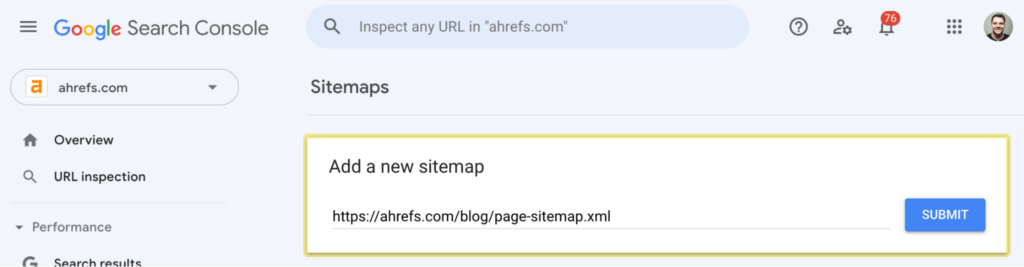
To submit your website map directly to Google, you can use the Google Search Console (GSC). It’s a quick and easy process.
Summary of key points
- SEO is the process of increasing organic search traffic to a website.
- Do this to rank better in organic search results.
- SEO is important because you are unlikely to achieve good ranking results without it.
- Ranking high gives you free, passive, consistent traffic month after month.
- SEO involves keyword research, content creation, on-page SEO, link building, and technical SEO.
- Doing SEO is much easier when your website is properly set up for SEO success.
- Google usually finds and indexes your website on its own, but sometimes you can speed up the process by submitting your sitemap.
